Smartwatches are integral daily companions, combining electronics with water-resistant seals and sensitive screens. Regular, mindful cleaning helps extend their life and keep displays clear. This guide walks through practical, user-safe methods to clean a smartwatch and its accessories without damaging components.
Quick Answer
Use a soft brush or microfiber cloth to remove dust and sweat, then wipe with a lightly damp microfiber cloth. Avoid harsh cleaners or full immersion unless the device is rated for it. Dry thoroughly and reassemble if needed.
What You’ll Need
- Smartwatch cleaning kit with soft brush and microfiber cloth
- Screen cleaning spray for smartwatches microfiber safe
- Microfiber smartwatch screen cloth 3-pack
- Watch band cleaning brush set for smartwatches
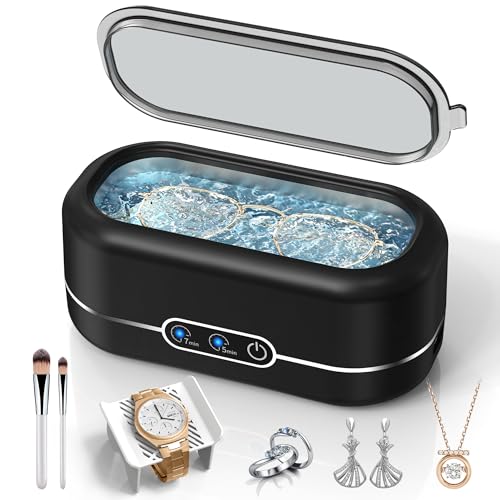
- Ultrasonic cleaner for smartwatch bands


Before You Start
Turn off the smartwatch and disconnect any charging cables before cleaning. If the model is water resistant, consult the user manual for acceptable cleaning methods and limits. Work in a well-lit area and avoid abrasive cleaners, solvents, or ammonia-based products that can damage coatings. Time estimate: 5–15 minutes for a routine clean; longer if bands require soaking or ultrasonic cleaning.
Caution: Do not immerse devices that are not rated for submersion or have damaged seals. If a device shows corrosion, swelling, or irregular screen behavior, stop cleaning and seek guidance.
Step-By-Step: How To Clean A Smartwatch
- Power off the smartwatch and remove it from any charger to prevent electrical issues during cleaning.
- Remove the watch band if possible; this allows thorough cleaning of both the case and the band using separate tools.
- Use a dry microfiber cloth to wipe away loose dust from the screen and case edges.
- Lightly dampen a microfiber cloth with a screen cleaning spray for smartwatches microfiber safe or just water, then wipe the display in a circular motion to lift smudges without soaking.
- Gently use a soft brush from the smartwatch cleaning kit to remove grime from crevices, speaker grilles, and around the watch band attachment.
- For stubborn residues, dip the brush slightly in water, then re-touch the affected areas. Avoid pooling liquid around ports or seams.
- Clean the watch band separately using the watch band cleaning brush set for smartwatches or an ultrasonic cleaner for smartwatch bands if the band material permits soaking. Dry completely before reassembly.
- Wipe the entire smartwatch with a dry microfiber cloth to remove any remaining moisture and restore a clean, streak-free finish.
- Reattach the band and perform a brief power-on check to ensure basic functionality after cleaning.
- Store the device in a cool, dry place away from direct sunlight when not in use to minimize coating degradation and screen residue buildup.
Troubleshooting
| Symptom | Likely Cause | Fix | Prevention |
|---|---|---|---|
| Cloudy screen after cleaning | Residual moisture | Wipe again with a dry microfiber cloth and allow extra drying time | Use minimal moisture and avoid direct spraying onto the screen |
| Scratches on screen or case | Abrasive cleaners or rough cloth | Switch to microfiber only; avoid scrubbing cluttered areas | Use dedicated screen cloths and soft brushes |
| Band discoloration after ultrasonic cleaning | Material sensitivity to ultrasonic waves | Check manufacturer guidance; reduce duration or skip ultrasonic | Only use ultrasonic if the band is rated for it |
| Water intrusion in charging area | Moisture near ports | Ensure ports are dry before reassembly | Drying interval and careful wiping around openings |
Common Mistakes
- Using harsh chemicals or ammonia-based sprays on screens
- Submerging non-waterproof devices in water or liquids
- Over-wetting the cloth and letting liquid pool in crevices
- Scrubbing vigorously, which can scratch coatings
Tips For Best Results
- Keep a dedicated microfiber cloth and brush set specifically for the smartwatch to avoid cross-contamination with other devices.
- Clean regularly—light daily wipe-downs prevent heavy grime buildup and make deeper cleans easier.
- Test any spray on a small, inconspicuous area before broad application to verify compatibility with coatings.
- For light stains, a simple damp cloth may suffice; reserve sprays for tougher smudges.
- If bands show odor, wash material per manufacturer guidance and allow full drying before reattachment.
Call A Professional
Seek professional service if the device exhibits water damage signs, persistent screen flickering, or corrosion around ports. Do not attempt aggressive opening or repairs yourself. If the smartwatch is under warranty and cleaning queries involve potential warranty impact, consult the manufacturer’s support line before proceeding.
FAQ
Can I use household cleaners on a smartwatch screen?
Avoid household cleaners with harsh chemicals; use products labeled safe for electronics or the dedicated screen cleaning spray designed for smartwatches.
Is ultrasonic cleaning safe for smartwatch bands?
Ultrasonic cleaning can be effective for some bands, but not all materials tolerate ultrasonic waves. Check band material guidelines before using an ultrasonic cleaner.
How often should I clean my smartwatch?
Clean a smartwatch weekly or as needed to remove sweat, oils, and dust. More frequent cleaning is helpful for athletes or in hot climates.
What should I do if the screen shows streaks after cleaning?
Use a fresh microfiber cloth and light pressure, making circular passes. If streaks persist, switch to a new cloth and ensure the cleaning solution is compatible with the screen coating.
Buying Guide
When selecting cleaning supplies for a smartwatch, consider size, ease of use, and compatibility with materials. A smartwatch cleaning kit with soft brush and microfiber cloth provides a safe, all-in-one solution for routine maintenance. A screen cleaning spray for smartwatches microfiber safe adds convenience for tough smudges without risking damage. A 3-pack of microfiber smartwatch screen cloth ensures you have spare towels to avoid cross-contamination between devices. For denim or silicone bands, a dedicated watch band cleaning brush set for smartwatches helps reach tight areas. If bands are washable and specified as ultrasonic-safe, an ultrasonic cleaner for smartwatch bands can simplify deeper cleaning. Consider your band materials, climate, and activity level to balance convenience with caution.
Key buying factors include:
- Size and form factor: Choose compact tools that fit around the watch case and band without hindering use.
- Noise level: Ultrasonic units vary in noise; select a quiet model for home use.
- Energy efficiency: Look for energy-saving cleaning devices or low-power options for extended use.
- Controls: Simple on/off controls and timers improve reliability for first-time users.
- Placement: A clean, dedicated workspace near a sink or drying area eases the cleaning process.
Balancing these factors helps ensure safe cleaning, prolonging the smartwatch’s appearance and performance while minimizing risk of damage.