Keeping Roomba brushes clean helps maintain suction power, prevent debris buildup, and extend the life of the vacuum. Regular maintenance is quick, inexpensive, and can be done with simple tools. This guide walks through a practical, step-by-step approach for American households using standard Roomba models.
Routine brush care matters for pet owners, households with long hair, and busy kitchens. The following steps focus on safe handling, efficient cleaning, and preventing tangles that reduce cleaning effectiveness.
Quick Answer
What you’ll do: remove hair and fibers from the brush and wheels, rinse if recommended by your model, and reassemble. Do this every few cleanings or when you notice hair buildup or reduced agitation.
What You’ll Need
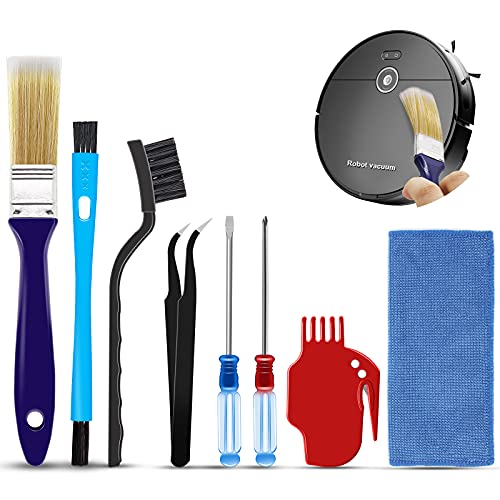
- Roomba brush cleaning tool
- robot vacuum brush cleaning kit
- replacement Roomba brush cleaning tool
- hair removal tool for robot vacuum brushes
- robot vacuum maintenance tool kit


Before You Start
Unplug the Roomba or remove the battery before beginning any maintenance. Work on a clean, flat surface to prevent losing small parts. Some models permit rinsing brushes with water; always consult the user manual for model-specific guidance. Never use harsh chemicals on brushes, and ensure brushes are completely dry before reinstalling. Set aside about 10–15 minutes for the entire process.
Step-By-Step: How To Clean Roomba Brushes
- Power down the Roomba and remove it from its charging dock.
- Turn the device over and locate the main brush area on the underside.
- Use the included robot vacuum maintenance tool kit to lift and detach the main brush assembly.
- Gently pull out hair, threads, and debris from the brush bristles with your fingers or a comb-like tool.
- Use the Roomba brush cleaning tool or replacement tool to clear stubborn tangles near the brush bearings.
- Check the brush bearings and end caps for damage; replace if needed.
- Wipe down surrounding components with a dry cloth; avoid moisture near the motor.
- Reinstall the brush assembly and secure all fasteners firmly.
- Reattach the Roomba to the dock and run a quick test cleaning to verify proper operation.
- Periodically inspect side brushes as well; repeat the process if you notice reduced suction or visible hair buildup.
- Record the date of maintenance to track intervals based on household usage.
- For models with washable components, allow brushes to dry completely before next use.
Troubleshooting
| Symptom | Likely Cause | Fix | Prevention |
|---|---|---|---|
| Reduced suction after cleaning | Hair tangled in main brush or wheels | Re-clean brushes and wheels; check for loose debris | Clean at regular, short intervals |
| Brush won’t rotate | Brush bearing jammed or blocked | Remove debris; inspect for wear; replace if necessary | Inspect after each use in high-hurried areas |
| Unusual noises | Loose fasteners or partial obstruction | Tighten screws; remove residual hair | Inspect monthly for loose parts |
| Water or moisture on brushes (when washable) | Improper drying | Air-dry thoroughly before reassembly | Follow model-specific drying guidelines |
Common Mistakes
- Using metal tools that damage bristles or bearings
- Rushing the cleaning and leaving debris behind
- Ignoring side brushes while focusing only on the main brush
- Spraying cleaners directly on the brush area
Taking a careful, deliberate approach prevents damage and prolongs brush life. A little time spent now can reduce maintenance frequency later.
Tips For Best Results
- Clean brushes at the first sign of tangling, especially in homes with pets or long hair.
- Use the right tool from the kit to prevent bristle damage and avoid slipping.
- Maintain a habit of checking bearings and end caps for wear.
- Keep replacement parts on hand to minimize downtime when a component wears out.
- Record maintenance dates to establish a predictable schedule.
Call A Professional
Call a professional if the Roomba shows persistent performance issues after cleaning, such as abnormal noise, vibration, or loss of suction that cannot be resolved with the routine steps. If water damage or electrical concerns arise, stop using the unit and seek service from an authorized technician.
FAQ
How often should I clean Roomba brushes?
Clean brushes every 1–2 weeks in typical use, or more often with pets or high hair shedding.
Can I wash Roomba brushes with water?
Some models allow washing; always follow the manufacturer’s instructions and ensure complete drying before reuse.
What tools are best for removing hair from brushes?
Use the included brush cleaning tool or a hair removal tool designed for robot vacuums to avoid damaging bristles.
What if the brush is damaged after cleaning?
Replace damaged brushes promptly using the replacement Roomba brush cleaning tool or the appropriate maintenance kit.
Buying Guide
Choosing the right maintenance setup helps maximize Roomba performance and longevity. When evaluating products, consider size compatibility with your Roomba model, ease of use, and whether the kit includes a dedicated hair removal tool for robot vacuum brushes. Look for durable plastic components, comfortable grips, and brushes that resist fraying. Noise considerations matter less for cleaning tools, but ergonomic design can reduce fatigue. Ensure the kit covers both the main brush and side brushes for a comprehensive maintenance routine.
Size And Fit
Ensure the brushes and tools are compatible with your Roomba model’s brush assembly. Some kits are universal, while others are model-specific. Check product descriptions for fit guidance and included spare parts.
Noise Level
Maintenance tools are typically quiet, but some kits include features that reduce friction during cleaning. For most users, noise is not a major concern compared with effectiveness and durability.
Energy Efficiency And Materials
Most maintenance tools consume no power beyond manual use. Look for durable plastics and rust-resistant metals that withstand regular cleaning.
Controls And Ease Of Use
Prefer tools with comfortable grips and straightforward operation. Features like snap-in brush heads or visit-friendly designs speed up cleaning without compromising safety.
Placement And Storage
Store tools in a dry, accessible cabinet or drawer near the Roomba charging station. A dedicated maintenance kit keeps everything organized and ready for quick sessions.