Maintaining a Dirt Devil vacuum by cleaning or replacing its filters helps sustain strong suction and prolongs the life of the machine. Regular care prevents dust and allergens from recirculating into your living space. This guide provides practical steps and safety notes to keep a Dirt Devil vacuum operating at its best.
Whether you own a compact model or a full-size upright, a clean filter is essential. The process blends simple cleaning with thoughtful filter replacements when needed. By following these steps, homeowners can optimize cleaning results without frequent service calls.
Quick Answer
Clean or replace the filter every 1–3 months depending on usage. Rinse nonHEPA filters with cool water and let them air dry completely before reusing. For HEPA or dirt cup exhaust filters, inspect for tears and replace if damaged. Use a dedicated cleaning brush to loosen debris from the filter housing.
What You’ll Need
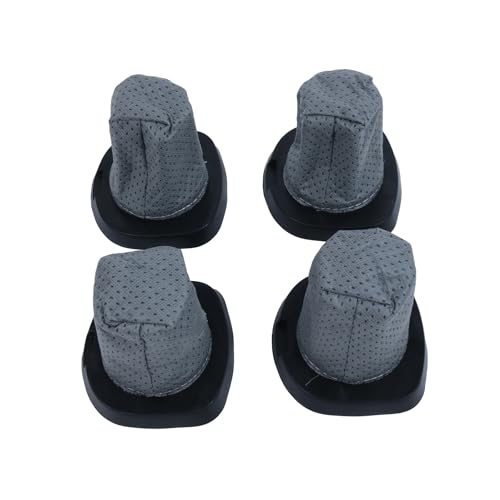
- Dirt Devil replacement vacuum filter kit
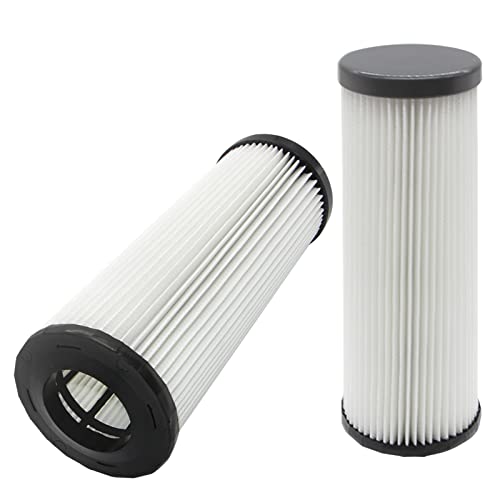
- Dirt Devil upright vacuum HEPA filter
- Dirt Devil 2-pack vacuum filters
- Dirt Devil vacuum filter cleaning brush
- Dirt Devil dust cup exhaust filter replacement

Before You Start
Turn off and unplug the vacuum before servicing. Remove the dust cup or bin and empty it into a trash can. Check the area for any small parts that might have shifted during use. Never rinse HEPA filters with hot water as heat can damage filtration media. Allow air drying for at least 24 hours to ensure all moisture is gone before reinstalling.
Time estimate: 10–20 minutes for a routine cleaning; 30–60 minutes if you replace multiple filters. If the vacuum has strong odor or reduced suction after cleaning, inspect the seal and consider a replacement filter kit for best results.
Step-By-Step: How To Clean Dirt Devil Vacuum Filter
- Unplug the vacuum and remove the dust cup or bin.
- Take out the filter assembly and gently tap to release loose debris.
- Use the vacuum filter cleaning brush to sweep loose dirt from the folds of the filter.
- If the filter is washable (nonHEPA), rinse under cool running water until the water runs clear. Do not use soap or harsh cleaners.
- Gently squeeze out excess water and press with a towel to remove moisture.
- Set the filter on a clean surface in a wellventilated area and let it dry completely, typically 24 hours.
- Reinstall the dried filter and reattach the dust cup or bin securely.
- Turn on the vacuum to verify suction and listen for unusual sounds that indicate a poor seal or misfit.
- If the filter is a HEPA filter or shows damage, replace it with a new one from a Dirt Devil replacement vacuum filter kit.
- Clean the exterior housing and dust cup seals to prevent air leaks that reduce efficiency.
- Record the date of cleaning and future replacement dates to create a maintenance schedule.
Troubleshooting
| Symptom | Likely Cause | Fix | Prevention |
|---|---|---|---|
| Low suction after cleaning | Filter not fully dry or incorrectly reseated | Dry completely and reinsert correctly | Allow full drying; confirm seals are tight |
| Smell coming from vacuum | Clogged dust path or moldy filter | Replace filter if odor persists; clean interior | Regularly replace or clean filters |
| Air escape from filter area | Damaged filter or seat | Replace damaged filter with a Dirt Devil kit | Inspect seals during maintenance |
| Filter durably dirty after short use | Fine debris or pet hair overload | Clean or double up with a second filter | Upgrade to a higher filtration option if needed |
Common Mistakes To Avoid
- Using hot water to rinse filters that require air drying only
- Reinstalling a damp filter, which can promote mold growth
- Ignoring the Dust Cup Exhaust or HEPA filter when performance drops
- Forgetting to replace worn seals or gaskets during maintenance
Tips For Best Results
Keep a regular maintenance schedule based on usage. If the vacuum handles heavy debris like drywall dust or pet hair, consider a Dirt Devil 2-pack vacuum filters option to rotate clean filters. Store spare filters in a dry place to avoid moisture during replacements. Use the vacuum filter cleaning brush to reach tight corners inside the filter housing. For models with a dust cup exhaust filter, ensure the filter is seated and clean to prevent exhaust dust from reentering the room.
Call A Professional
Seek professional service if the vacuum experiences persistent loss of suction after thorough cleaning and filter replacement, or if unusual noises continue. Do not attempt to disassemble motor components or seals beyond basic filter care. If the unit is under warranty, consult the manufacturer’s service guidelines to avoid voiding coverage.
FAQ
Can I wash all Dirt Devil filters?
Most nonHEPA filters are washable with cool water, but always check the label. HEPA filters are typically not washable and should be replaced when dirty.
How often should I replace Dirt Devil filters?
Replace filters every 3–6 months for average use; more often with heavy use or in homes with pets. Use the Dirt Devil replacement vacuum filter kit for best compatibility.
What if the vacuum still loses suction after cleaning?
Inspect the dust cup, seals, and brushes for blockages. If issues persist, replace with a new filter and consider the dust cup exhaust filter replacement.
Is it okay to dry filters in a sunny window?
Yes, but avoid direct, intense heat which can degrade filter material. Air dry in a shaded area with good airflow.
Buying Guide
Key buying factors help choose the right filters and accessories. Consider size compatibility with your Dirt Devil model, noise level during operation, energy efficiency, and the availability of a Dirt Devil replacement vacuum filter kit for easy upgrades. Pay attention to whether your machine uses a HEPA filter or standard filtration, as this affects replacement frequency and cost. Look for a multiPack option like the Dirt Devil 2-pack vacuum filters to reduce maintenance downtime. Placement matters too; store spare filters in a dry, cool area away from direct sunlight to extend their life.