Answer: For curved TVs, choose a low-profile, full-motion or tilt mount that supports curved panels and a wide VESA pattern. This guide highlights five reliable mounts suited for curved screens, helping you pick options that minimize gap, reduce glare, and fit your wall type. The listed products are best for living rooms seeking flexible viewing angles, home offices needing a compact setup, or bedrooms where space is at a premium.
Buyer-friendly overview: The top five picks below balance compatibility, wall profile, and motion range. Use the quick-reference table to match each product to your TV size, wall type, and preferred viewing angle.
| Product | Best For | Wall Type | VESA Range | Tilt/Swivel |
|---|---|---|---|---|
| USX Mount Tilting TV Wall Mount | Curved screens up to 95″ with tilt | Wood or concrete/brick walls | 150×100 to 600×400 mm | +0°/-10° tilt |
| USX MOUNT Full Motion TV Wall Mount | Large, versatile viewing with full motion | Wood studs or solid walls | 200×100 to 600×400 mm | ±4° post-install, ±45° swivel, ±5° to -15° tilt |
| Mounting Dream MD2380 | 32-65″ with easy install and full motion | 16″ or more wood studs | 400×400 mm and smaller | +5° to -15° tilt, ±90° swivel |
| Mounting Dream MD2163-K | Fixed, ultra-low-profile for curved TVs | 16″-24″ studs | 600×400 mm and compatible | Fixed |
| WALI TV Mounting Hardware Kit | Hardware compatibility for curved TVs | Not a wall mount itself | N/A | N/A |
USX MOUNT Tilting TV Wall Mount for 37″-95″ Curved Screens

This wall mount is designed for curved and flat TVs up to 132 lbs with VESA patterns from 150 x 100 to 600 x 400 mm. It offers a slim profile that brings the TV as close as 1.61″ to the wall, maximizing space. Best for rooms where a low-profile appearance is important and where slight downward tilt helps reduce glare from seating positions. The tilt is +0°/ -10°, allowing mild adjustment after installation. A limitation is the tilt range being modest, which may not suit viewers needing wide-angle tilt for very high or very low seating arrangements.
USX MOUNT Full Motion TV Wall Mount

Best for large-curved or flat TVs within 37″-84″ range, this mount supports dual articulating arms and a broad VESA range from 200×100 to 600×400 mm. It offers a wide tilt range (+5°/-15°) and a substantial swivel capability (up to ±45°, depending on TV size). Retract and extend smoothly (2.62″ to 15.02″), saving space while enabling repositioning. Choose this for rooms where viewing from multiple seats is common. A potential limitation is the longer pull-out distance, which requires additional wall clearance during full extension.
Mounting Dream MD2380 Full Motion

Best for 32-65″ TVs up to 99 lbs with max VESA 400×400 mm. This mount offers a strong full-motion range with tilting from +5° to -15° and ±90° swivel. It extends up to about 17.5″ and retracts to about 3.4″, delivering flexible viewing from multiple seats. It’s easy to install with labeled hardware and a template. Best for users who want quick adjustments and straightforward setup; however, the extension length may require deeper wall backing in some spaces.
Mounting Dream MD2163-K Fixed Low-Profile
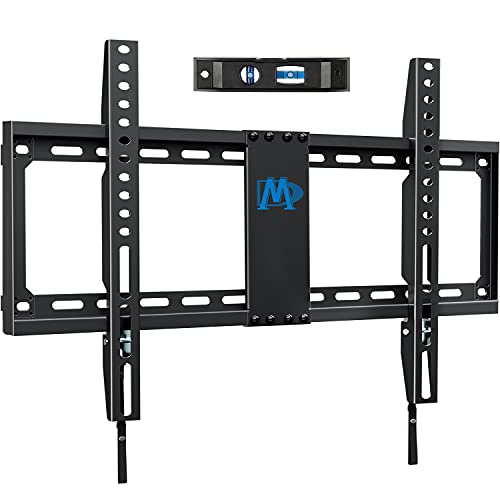
Best for 42-84″ curved or flat TVs up to 132 lbs with VESA patterns up to 600×400 mm. This fixed mount sits just 1.1″ from the wall, delivering a near-flush look ideal for minimalist decor. It supports 16″, 18″, or 24″ studs and is designed for a clean, unobtrusive installation. A limitation is the lack of tilt or swivel, which makes this option less suitable if glare reduction or repositioning is needed after mounting.
WALI Universal Mounting Hardware Kit

Best as a companion accessory for curved TVs, this 68-piece hardware kit includes M4, M5, M6, and M8 screws, spacers, and washers, covering a broad range of VESA patterns up to 80″ TVs. It helps ensure compatibility across various mounts and brands. It’s not a wall mount itself, but it is a practical part of a secure installation. A caveat is that this kit does not substitute for a proper wall-mounting solution when your TV needs mounting hardware beyond standard requirements.
Perlegear Full Motion TV Wall Mount

Best for small to mid-size curved TVs (13-43 inches) with VESA 200×200 mm or smaller and up to 44 lbs. This mount provides a versatile tilt (+5°/-15°) and a wide horizontal swivel (up to ±90°, depending on TV size). Its extendable arm (up to 15″) allows repositioning for the best viewing angle and distance. It’s a good pick for desks, small living areas, or dorm rooms. A limitation to watch is that very large curved displays may require a larger mount with higher weight capacity.
Buying Guide: Key Considerations for Curved TV Mounts
- TV size and weight: Confirm the mount’s weight limit and the TV’s weight before purchasing.
- VESA compatibility: Ensure the mount supports your TV’s VESA pattern, especially if you have an unusual pattern common in curved models.
- Profile vs. motion: If space is tight, choose a low-profile fixed or tilt mount. For flexible viewing, prefer full-motion mounts with larger extension and swivel ranges.
- Wall type and studs: Verify wood stud spacing and wall structure (brick/concrete) to ensure safe mounting. Some mounts support 8″ to 24″ stud spacing; others require special anchors.
- Glare reduction: Consider tilt ranges to minimize glare from windows or ceiling lights. For high seating, a tilt with a mild downward angle often helps.
- Installation ease: Look for pre-labeled hardware, templates, and level indicators to simplify setup and ensure proper alignment.
FAQ
- Do curved TVs require special mounts? Not necessarily, but many curved TVs benefit from full-motion or tilt mounts to optimize viewing and minimize glare.
- What is VESA, and why does it matter? VESA refers to the square mounting pattern on the back of the TV. The mount must match your TV’s VESA size to install properly.
- Can I mount on brick or concrete walls? Yes, many mounts support brick or concrete with appropriate anchors; check the product specs for compatible wall types.
- Is a low-profile mount better for small rooms? Yes, a low-profile or fixed mount keeps the TV close to the wall, maximizing space in tight spaces.
- What if the mount’s extension is too long? Ensure there is enough clearance behind the TV and furniture, and measure room depth to avoid obstructions when fully extended.
- How important is tilt range for glare reduction? Tilt helps minimize glare by adjusting the screen angle relative to light sources; larger tilt ranges offer more flexibility.