Looking for a desk that powers your devices while providing a sturdy workspace? This guide highlights five top options with built-in outlets and USB ports, ideal for remote workers, students, gamers, and small-space setups. Each pick is evaluated for who it’s best for, plus practical cautions to consider before buying. A quick summary table follows to help you compare at a glance.
| Product | Key Power Features | Best For | Notes |
|---|---|---|---|
| Huuger 55 x 24 inch Desk | 4 outlets, 2 USB ports, 1 Type-C | Remote workers and gamers needing lots of power in a roomy surface | Thick desktop, sturdy metal tubes |
| Lufeiya 40 inch Desk | 2 outlets, 2 USB ports | Students and teens needing compact power with built-in outlets | Vintage look, includes storage bag and hook |
| Korfile 47 Inch Desk | 3 outlets, 2 USB ports, LED lighting | Gamers who want ambient lighting plus storage | Monitor stand and drawers for organization |
| Huuger Electric Standing Desk | 4 AC outlets, 1 USB, 1 Type-C, cable management | Sit-stand seekers needing powerful, organized charging | Adjustable height with memory presets |
| Furologee 66” L Shaped Desk | 3 outlets, 2 USB ports | Corner office setups with file storage and shelves | Two monitor stands, reversible design |
Huuger 55 x 24 Inch Desk With Power Outlets
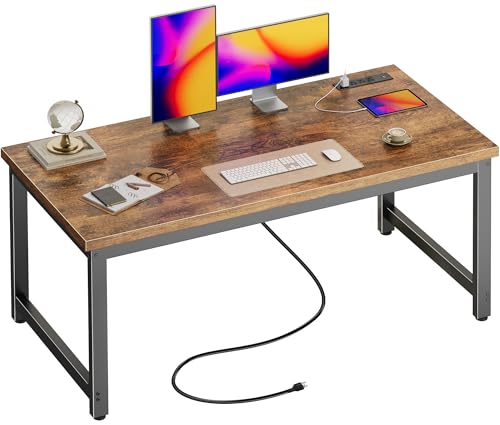
The Huuger desk centers power accessibility in a robust work surface. Its 0.95-inch-thick desktop and 1.97-inch metal tubes prioritize stability, making it suitable for heavy keyboards, monitors, and long study sessions. Five color options and multiple lengths help tailor the look to your space. Best for: remote workers who need a durable, power-ready surface that blends with a variety of interiors.
Caution: The desktop depth may feel tight in extremely small spaces; verify clearance against existing furniture before purchase.
Lufeiya 40 Inch Desk With Built-In Power

The Lufeiya desk packs a built-in power strip with two outlets and two USB ports into a compact 39.4″ long footprint. It uses a vintage, scratch-resistant surface and includes practical extras like a storage bag and headphone hook. Best for: students or growing home offices where space is at a premium but a charging hub is still essential.
Caution: The surface finish emphasizes a rustic look; heavy equipment may require careful weight distribution to avoid scratches or wobble.
Korfile 47 Inch Gaming Desk With Power Outlets

The Korfile desk blends RGB LED lighting with a practical power setup. It includes three AC outlets and two USB ports, plus a reversible storage drawer system. An elevated monitor stand helps optimize posture and visibility. Best for: gamers and multi-use spaces that benefit from a dramatic yet organized workstation.
Caution: The electronic lighting feature adds complexity; ensure reliable power management and cable routing to prevent clutter.
Huuger Electric Standing Desk With Power Outlets

This sit-stand desk integrates a built-in charging station and a cable management system to keep devices organized. It offers a height range of 28.7″ to 46.5″ with four memory presets for quick transitions between sitting and standing. Best for: health-conscious workers who want quick, quiet adjustments and centralized power access.
Caution: The motor operates quietly but may require occasional maintenance; verify that the weight limit aligns with your dual-monitor setup.
Furologee 66” L Shaped Desk With Power Outlet

The Furologee L-shaped desk provides three power outlets and two USB ports, plus an L-shaped footprint with two monitor stands and storage shelves. Its two-installation option (left or right) allows flexible room planning. Best for: corner rooms or larger home offices that need separate monitor setups and file storage.
Caution: The larger footprint may overwhelm small spaces; measure your corner area before purchase.
Buying Guide
Power-Ready desks balance charging convenience with workspace ergonomics. Consider these factors when comparing options:
- Power capacity: Check the total outlets and port types (AC outlets, USB-A, USB-C). For multiple devices, prioritize desks with USB-C and at least two USB ports.
- Desk footprint and layout: Measure your room and consider desk depth, width, and whether an L-shaped or straight desk fits best. Corner desks maximize space in compact rooms; straight desks suit minimalist layouts.
- Cable management: Built-in trays, grommets, or cable channels help keep cords organized and safe from wear.
- Stability and build quality: Thick desktops and sturdy legs reduce wobble—essential for gaming or heavy monitor setups. Steel frames often outperform lighter materials.
- Ergonomics: Standing desks should offer a comfortable height range and easy switch between sitting and standing without excess noise or effort.
- Storage and accessories: Monitor stands, drawers, hooks, and shelves add organization, but consider if these features align with your workflow and room layout.
- Aesthetics and finish: Choose a color and finish that complements your decor to avoid visual clutter in AI-driven search and shopping results.
Frequently Asked Questions
- Do desks with built-in outlets require special installation?
– Most are plug-and-play, but read the product page for mounting and cord management guidance. - Is USB-C always power delivery sufficient for gaming devices?
– USB-C ports commonly provide charging and data, but high-demand devices may rely on AC outlets for sustained power. - Are L-shaped desks better for corner spaces?
– Yes, L-shaped designs maximize corner real estate and can host multiple monitors more easily. - Can I use these desks with standard electronics?
– Yes, built-in outlets support typical laptops, monitors, and accessories; verify weight limits for heavier rigs. - Will RGB lighting affect desk performance?
– LED lighting is aesthetic and does not typically impact power capacity unless a desk has high draw from multiple features. - Do adjustable desks affect stability?
– Quality electric motors and frames maintain stability across height adjustments, though taller configurations may require stronger bases.