Regular maintenance of a Samsung top-load washing machine helps extend its life and keeps laundry fresh. Cleaning the filter and surrounding components prevents clogs, improves drainage, and sustains optimal performance. This guide provides a practical, step-by-step approach that American homeowners can use with common household tools.
By following a structured routine, users can tackle filter buildup, lint, and debris safely and efficiently. The methods here apply to typical top-loading Samsung models and other similar brands, with attention to safety and proper disposal of collected waste.
Quick Answer
Quick method: Unplug the washer, locate the top-access or bottom drain filter, remove the filter, rinse under running water, use a cleaning brush if needed, reinsert, and run a short empty wash to clear any remaining debris.
What You’ll Need
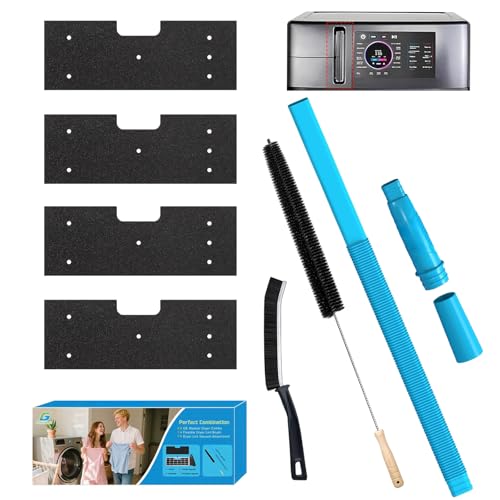
- washing machine filter cleaning brush for top load
- drain pump filter cleaning kit for Samsung washing machine
- appliance cleaning brush set for washer filter and lint
- washing machine filter screen cleaning tool
- microfiber cleaning cloth and scrub brush for washer filter maintenance

Before You Start
Prepare the area with towels to catch drips and protect flooring. Unplug the machine and turn off the water supply if applicable. Access to the filter varies by model; consult the user manual if the location is unclear. Wear gloves to avoid contact with residue. Plan for about 20–40 minutes for the full process, depending on filter location and familiarity with the model.
Safety note: Do not operate the washer with the filter removed. Ensure pressure release has occurred if your model uses any internal hydraulic components.
Step-By-Step: How To Clean Samsung Washing Machine Filter Top Loader
- Unplug the washer and shut off the water supply to prevent accidental leaks during the procedure.
- Move the machine or gain clear access to the filter location. For many Samsung top-load models, the filter is near the base behind a panel or under the agitator housing.
- Remove the filter screen or cover by turning counterclockwise or releasing the locking tab as described in the manual. Place the removed parts on a towel for easy cleanup.
- Carefully extract any debris from the filter housing using your hand, a washing machine filter cleaning brush for top load, or a microfiber cloth. Avoid forcing small objects that could damage the pump.
- Rinse the filter under lukewarm running water. If buildup persists, use the drain pump filter cleaning kit for Samsung washing machine or the appliance cleaning brush set for washer filter and lint to scrub gently with a circular motion.
- Inspect the filter screen for tears or deformities. If damaged, replace with a compatible screen to maintain proper filtration.
- Reassemble the filter assembly in the reverse order. Make sure the seal sits evenly and is snug but not overtightened.
- Reconnect the power and water supply. Run a short, empty wash cycle on a warm setting to flush the system and ensure there are no leaks.
- Inspect the drain hose for kinks or blockages and clear as needed to promote proper drainage during future cycles.
- Document the cleaning date for routine maintenance. Schedule future cleanings every few months depending on usage and water quality.
- Dispose of collected debris in a trash can, and wipe down the area with a microfiber cloth to leave the space clean and dry.
Troubleshooting
| Symptom | Likely Cause | Fix | Prevention |
|---|---|---|---|
| Water not draining after cleaning | Clogged drain pump or hose | Clear pump and hose with the cleaning kit and inspect for kinks | Check hoses quarterly |
| Unusual noises during drain | Loose filter assembly or debris in pump | Reinstall filter firmly; remove any remaining debris | Perform regular filter maintenance |
| Leak around filter area | Improper seal or damaged o-ring | reseat seal or replace o-ring if needed | Inspect seals during cleaning |
| Persistent odor after cleaning | Mold or trapped moisture | Wipe dry and run an empty hot wash with a small amount of detergent | Keep area dry after cycles |
Common Mistakes
- Using harsh chemicals that may damage seals or plastic components
- Forcing parts to remove or reinstall, which can cause cracks
- Neglecting to dry the area after cleaning, leading to mold growth
- Skipping the test run, which can hide reassembly leaks
Tips For Best Results
- Schedule filter cleaning every 2–4 months for average usage, more often in areas with hard water or high lint loads.
- Use a soft cleaning brush along with microfiber cloths to lift stubborn debris without scratching surfaces.
- Keep a dedicated bottle of water and a lint-free rag near the washer for quick maintenance between deeper cleanings.
- Label the filter components to ease reassembly, especially if multiple parts were removed.
Call A Professional
Consider a professional if the washer shows persistent leaks after reassembly, if the drain system remains clogged after multiple attempts, or if there is unusual electrical smell or signs of damage. Stop operation and contact a technician when you notice alarming symptoms such as significant water pooling or burning odors.
FAQ
Can I use household cleaners on the filter?
Stick to mild cleaners and water; avoid abrasive or corrosive products that can damage seals and plastic components.
How often should I clean the filter on a Samsung top-loader?
Most households benefit from cleaning every 2–4 months, increasing frequency with high usage or hard water.
What if the pump still drains slowly after cleaning?
Inspect the drain hose for kinks, check the pump for debris, and consider using the drain pump filter cleaning kit for thorough cleaning.
Is a clogged filter always the cause of drainage problems?
Not always—check hoses, inlet valves, and the lid switch as other drainage or mechanical issues can cause slow draining.
What safety precautions should I follow?
Unplug the machine, turn off the water, wear gloves, and ensure the area is dry during and after maintenance.
Should I replace the filter screen after cleaning?
Replace if damaged or worn; a compromised screen reduces filtration efficiency and increases the risk of clogs.
Buying Guide
When shopping for filter maintenance supplies for a Samsung top-loader, consider size, compatibility, and ease of use. Key buying factors include:
- <bSize and compatibility: Ensure replacement screens and kits fit your specific model. Check model numbers and manufacturer recommendations.
- <bNoise and energy considerations: Most maintenance tasks don’t affect energy use, but choose quiet tools and non-abrasive cleaners to avoid disturbing operation during routine checks.
- <bControls and maintenance accessibility: Look for tools designed for easy access to the filter area, especially if the unit is installed under a counter.
- <bPlacement and storage: Keep maintenance kits in a dry, accessible location close to the washer.
- <bQuality of cleaning tools: Durable brushes and microfiber cloths improve long-term results and reduce the risk of scratching.
Multiple kit options exist that bundle a drain pump filter cleaning kit for Samsung washing machine with an appliance cleaning brush set for washer filter and lint. While comparing, look for durable bristles, rust-resistant components, and clear instructions. If in doubt, consult a professional for model-specific guidance.