Maintaining a CD player’s performance involves careful cleaning of the lens, optics, and internal components. Proper techniques help reduce read errors and extend the life of the drive. This guide outlines practical, safe methods using common electronics cleaning supplies that are readily available in the United States.
Quick Answer
To clean a CD player safely, use a dedicated lens cleaning kit or lint-free microfiber cloth combined with a gentle cleaning solvent designed for optics. Avoid harsh solvents and never spray liquid directly onto the unit. If CDs skip or mistrack, start with compressed air to remove loose dust, then treat the lens with a gentle cleaner and cloth, and test with a known good disc.
What You’ll Need
- CD lens cleaner kit with microfiber cloth
- electronics cleaning spray isopropyl alcohol 99%
- lint-free microfiber cloth for CD player lens cleaning
- anti-static cleaning swabs for optical drives
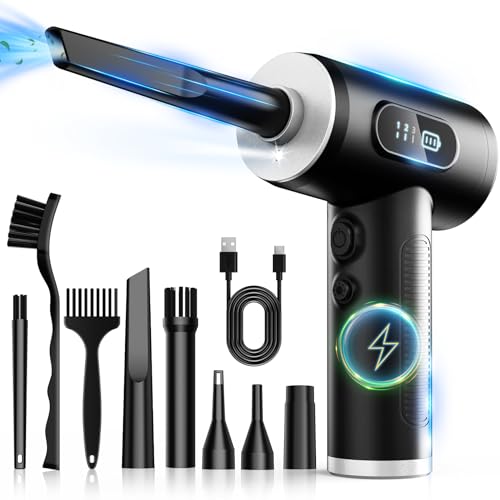
- compressed air duster for electronics cleaning


Before You Start
Before beginning, unplug the CD player and remove any discs. Work in a dust-free area and lay the unit on a clean, dry surface. Avoid using water directly on internal components and never spray liquids into the drive slot or chassis. Have a clean, dry microfiber cloth ready for final polishing, and test the player with a known good CD after each cleaning step.
Step-By-Step: How To Clean A CD Player
- Power off and unplug the player; remove any CDs from the tray to prevent damage during cleaning.
- Use the compressed air duster to gently blow dust from the external vents and around the CD tray area. Hold the can upright and short bursts to avoid moisture spray.
- Inspect the disc tray and loading mechanism for visible debris; if present, wipe with a dry lint-free microfiber cloth.
- If using a lens cleaning kit, follow the kit’s instructions. Typically, brush or swab the lens with the included cleaning device, ensuring light, even pressure.
- Alternatively, dab a small amount of isopropyl alcohol 99% onto a lint-free microfiber cloth or anti-static swab. Lightly wipe the lens surface in a single direction; avoid circular scrubbing.
- For stubborn residue, use anti-static cleaning swabs designed for optical drives; gently glide the swab across the lens area with steady, light pressure. Do not reuse swabs on other components.
- Allow any solvent to evaporate completely before reassembling; run a dry test by inserting a clean CD and attempting a basic playback or track skip test.
- If playback issues persist, repeat the gentle lens cleaning once more with fresh materials. Do not over-clean, as repeated abrasion can damage coatings.
- Clean the exterior surfaces with a damp (not wet) microfiber cloth to remove fingerprints and dust, then dry with a separate lint-free cloth.
- Test with multiple discs of different types (CD-R, CD-RW, and standard audio CDs) to gauge improvement and confirm consistent reading across media.
- Store the device in a stable, dust-free location and maintain a regular cleaning routine to prevent buildup.
Troubleshooting
| Symptom | Likely Cause | Fix | Prevention |
|---|---|---|---|
| Disc spins but skips or stalls | Dusty lens or tray mechanism | Clean lens and tray area with compressed air and a microfiber cloth | Regular quick cleanings; use anti-static swabs as needed |
| No playback or error messages | Dirty lens or dirty discs | Clean lens; wipe discs before playing | Keep discs clean; store in cases |
| Disc not recognized | Dirty or warped disc surface | Clean disc surface with microfiber cloth; test another disc | Avoid touching the data surface |
| Excess noise from drive | Dust in tray or motor | Blow out dust, inspect for obstruction | Keep surroundings clean and free of loose debris |
Common Mistakes
- Spraying liquids directly onto the CD player interior
- Using household cleaners not formulated for optics
- Over-scrubbing the lens or applying excessive pressure
- Using old or dirty cloths that leave lint on lenses
- Rushing cleanings and skipping the drying step
Sticking to recommended products and gentle techniques helps avoid damaging coatings on the lens or misaligning the drive mechanism.
Tips For Best Results
- Work in a well-lit area to spot dust and smudges easily.
- Choose a dedicated lint-free microfiber cloth for optics to minimize lint shedding.
- When using isopropyl alcohol, ensure it is 99% or higher and allow full evaporation before testing.
- Keep a small supply of anti-static swabs on hand for occasional lens touch-ups.
- Perform routine cleanings before long-term storage of CDs or frequent playback in dusty environments.
Call A Professional
Consider professional service if the CD player exhibits persistent read errors after repeated safe cleanings, makes unusual grinding noises, or fails to recognize any discs. Stop attempting internal cleaning if the unit is under warranty or if you notice loose mechanical parts, unusual odors, or smoke. A pro can diagnose optical drive alignment, motor issues, or worn laser components that require specialized tools.
FAQ
Can I use window cleaner on a CD player?
No. Window cleaners contain additives that can damage plastics and coatings in the drive. Use isopropyl alcohol or a dedicated electronics cleaning product as directed.
How often should I clean a CD player?
Clean the exterior weekly and perform a lens clean every few months if you use the player daily; increase frequency in dusty environments.
Will a CD lens cleaner kit work for all drives?
Most kits help with basic lens debris, but some drives may require manual lens cleaning or professional service if issues persist.
What should I do with greasy fingerprints on discs?
Wipe discs with a lint-free microfiber cloth from the center outward in a straight line, using minimal pressure.
Is compressed air safe for all electronics?
Yes when used in short bursts and held upright, but avoid spraying at the lens directly if the can’s nozzle emits moisture.
Can I reuse cleaning swabs?
No. Use fresh swabs for each pass to prevent re-depositing debris onto the lens.
What if my disc still won’t play after cleaning?
Test with multiple discs. If issues persist, the lens or drive motors may be worn; consult a professional.
Buying Guide
When choosing cleaning supplies for a CD player, consider factors such as compatibility with optics, finish quality, and ease of use. Look for products designed for electronics rather than household cleaners, and prefer lint-free materials to minimize fiber shedding. For those seeking a one-and-done approach, a respected CD lens cleaner kit can provide a guided method with included cleaning tools. If you already own an electronics cleaning spray, ensure it is 99% isopropyl alcohol and approved for optical components. A compact compressed air duster is useful for routine dust removal around the drive bay, vents, and front panel. Placement matters too: keep the player away from dusty shelves, heat sources, and direct sunlight to reduce residue buildup over time. Regular maintenance, gentle handling, and using the right tools will help maintain clear laser focus and reliable playback across CD formats.